The Complete Guide to Google Business Profile Optimisation for Small Businesses (2025)
Why Google Business Profile Optimisation Matters More Than Ever
If you run a local business, tradie service, clinic, or home-based operation, Google Business Profile optimisation is no longer optional — it’s the foundation of your online visibility. When customers search for your service, they’re not scrolling websites… they’re clicking the first business Google shows in the Maps 3-pack. And if you’re not there, you’re invisible — even if you’re the best in your area.
In 2025, Google Business Profiles (GBPs) influence:
- How many calls you get
- How many customers message you
- Whether you show up for priority suburbs
- How many reviews you attract
- Whether Google trusts your business
- Your competitiveness against bigger brands
The good news?
You don’t need ads, a fancy website, or technical skills.
You just need to understand how Google decides which businesses to rank — and how to send the signals it’s looking for.
This complete guide breaks it all down in a simple, practical, no-BS way. Every step is something a small business owner can do themselves. And if you don’t have time, Miss K Local can handle the heavy lifting.
What Is Google Business Profile Optimisation?
Google Business Profile optimisation is the process of improving your GBP so Google sees it as:
1️⃣ accurate
2️⃣ trustworthy
3️⃣ active
4️⃣ relevant to user searches
Most small businesses think “setting it up once” is enough. It’s not.
Google ranks profiles based on ongoing signals, including:
- completeness
- activity
- relevance to search terms
- proximity
- reviews and responses
- freshness of content
- consistency across the web
If you optimise your profile properly, you can outrank competitors who’ve been around longer — even if they spend more on ads.
Why Google Maps Ranks Some Businesses Higher Than Others
Google’s local algorithm is based on three core factors:
1. Relevance
Do you match what the customer is searching for?
This relies on:
- categories
- services
- keywords in descriptions
- keywords in posts
- reviews mentioning the service
This is where Google Business Profile optimisation makes the biggest difference.
2. Distance
How close you are to the searcher.
This is why service areas matter.
3. Prominence
How established, active, and trusted you appear.
Prominence signals include:
- number of reviews
- average star rating
- frequency of posts
- completeness of your profile
- how often customers interact
You can’t control distance.
But you CAN control relevance and prominence — and that’s why optimisation is powerful.
The Biggest Mistakes Small Businesses Make
Here are the most common issues I see when auditing profiles:
❌ Wrong category selected
Choosing “store” instead of “service”, or picking only one category.
❌ No service areas listed
You rank only in your home suburb if this is missing.
❌ Empty services tab
Google uses this to trigger keyword matches.
❌ No photos or outdated photos
Google prefers profiles with regular updates.
❌ No posts
Weekly posting is one of the easiest ranking boosters.
❌ Not asking for reviews consistently
Reviews are the strongest trust signal.
❌ Not responding to reviews
Google reads your replies as “fresh content.”
These mistakes cost businesses hundreds of lost leads.
How to Set Up Google Business Profile Optimisation the Right Way (Step-by-Step)
Here’s your no-BS walkthrough of every step that matters in Google Business Profile optimisation.
Step 1: Choose the Right Primary Category
Your primary category is THE most important ranking factor after proximity.
Examples:
- Electrician → “Electrician”
- Cleaner → “House Cleaning Service”
- Physio → “Physical Therapist”
- Lawn Mowing → “Lawn Care Service”
- Plumber → “Plumber”
Choose the exact match — NOT a broader one.
Then add 4–8 secondary categories where relevant.
Step 2: Add Service Areas Properly
Most businesses put one suburb: their home address.
This suffocates your rankings.
Instead:
- Add 10–20 target suburbs
- Include high-value areas
- Include suburbs where your ideal customers live
- Remove areas too far away to avoid low-quality leads
This is one of the top wins in Google Business Profile optimisation.
Step 3: Complete Every Field
Google prioritises complete profiles.
Fill out:
- Opening hours
- Website
- Phone
- Business description
- Services
- Products (optional for service-based businesses)
- Business attributes (female-led, veteran-owned, wheelchair access, etc.)
Step 4: Write a Strong Business Description
Include:
- What you do
- Where you operate
- Who you serve
- What makes you different
- Keywords naturally
Example based on Miss K Local’s services:
Miss K Local provides practical Google Business Profile optimisation, review automation, and local SEO support for small businesses, tradies, and clinics across Adelaide. We help you show up, get found, and turn online searches into real customers.
Step 5: Add Services With Keywords
Google scans your services list for keywords.
Add every service you provide, and write short descriptions underneath.
This improves the relevance score dramatically.
Step 6: Upload Photos Weekly
Phones pics are fine — consistency matters more than aesthetics.
Types of photos to include:
- team
- work in progress
- before and after
- products
- location
- tools
- customer results
Google boosts profiles with frequent photo updates.
Step 7: Post Weekly (Yes, It Helps Rankings)
Weekly posts signal:
- activity
- freshness
- relevance
Every post should include:
- a keyword
- a service
- a suburb
- a call to action (call, message, book, visit)
This is where many businesses see the fastest gains from Google Business Profile optimisation.
Step 8: Reviews + Replies = Ranking Power
Ask every happy customer:
“Hey! Mind leaving us a quick Google review? Here’s the link.”
Then REPLY.
Google reads your responses as content.
Reviews mentioning your services help you rank for those services.
Use templates from your Review Toolkit to speed this up. For businesses wanting a more consistent approach, review automation systems can remove friction from the process.
Advanced Optimisation Tactics (2025 Edition)
Once your basics are done, these steps push you into the Top 3.
1. Use keywords in review replies
Not keyword-stuffed — just natural.
Example:
“Thanks so much for choosing us for your lawn mowing in Salisbury Heights!”
2. Geo-targeted posts
Include:
- service
- suburb
- customer outcome
These improve local relevance.
3. Add UTM tracking to your website link
This allows you to see GBP traffic inside Analytics.
4. Refresh service areas quarterly
Google loves accuracy.
5. Use review automation
Manual review chasing = inconsistent.
Automation = predictable ranking growth.
Tools like your Review Booster Toolkit make this easy.
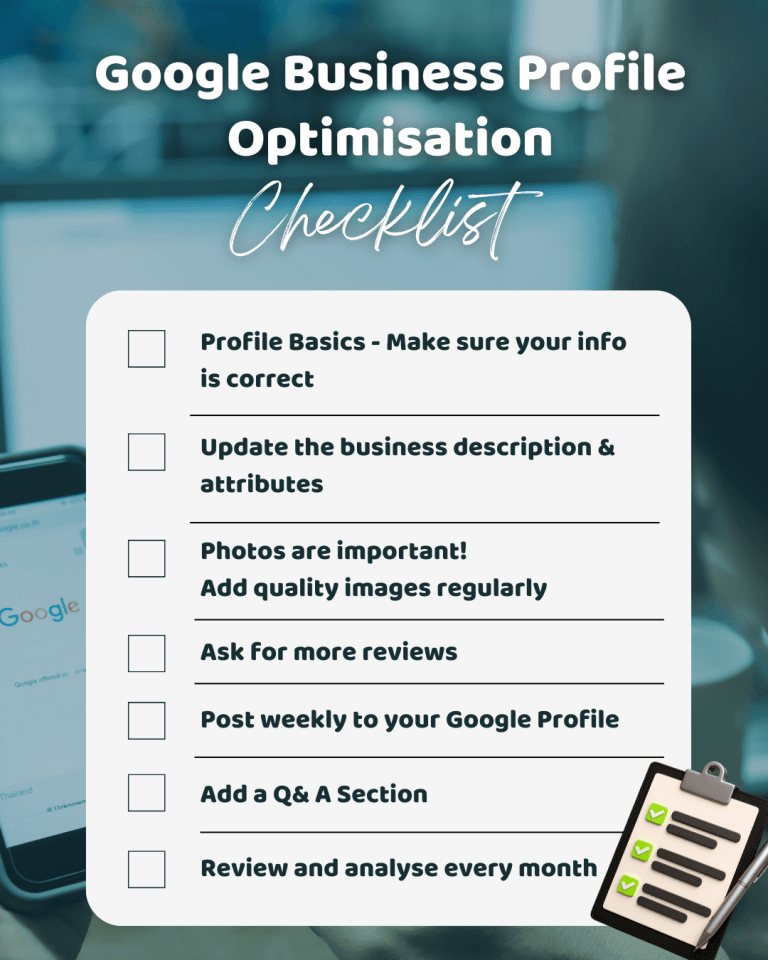
Need more help – Check out the Google Business Profile Optimisation Checklist for Small Businesses (2025)
How Long Does Google Business Profile Optimisation Take?
Most businesses see improvements in:
- 30 days → engagement
- 60 days → better suburb visibility
- 90 days → stable rankings and more calls
If you’re in a competitive market or have poor reviews, it may take longer — but consistent signals ALWAYS win.
In the case of my Lawn Mowing client, in just 60 days we saw massive improvements in suburb visibility and ranking across more keywords. 82% of the searches now turned up on page 1. This was achieved without doing ads or any extra reviews, just pure optimization and posting.
What Success Looks Like
A fully optimised profile leads to:
- more map impressions
- more calls
- more messages
- more website visits
- more jobs booked
- wider suburb reach
- higher ranking consistency
This is why Google Business Profile optimisation is the single highest ROI action for small local businesses in 2025.
DIY or Done-For-You (DFY)?
You CAN do all of this yourself (and that’s why this Knowledge Hub exists).
But if you’re short on time, Miss K Local offers:
✔ Google Business Profile Optimisation (DFY)
✔ Review Automation Setup & Tools for you to DIY
✔ DIY Templates + Toolkit
Either way — you’re supported.

In 2025, Google Business Profile optimisation is the foundation of local visibility. It affects who finds you, how customers trust you, and how consistently you get work. With the right setup and ongoing updates, any small business can outrank bigger competitors and turn Google into a daily source of leads — no ads needed.
If you want the simplest next step, grab the free Review Booster Preview and start improving your profile today. You’re closer to better rankings than you think.
You’ve got this
Miss K Local