The Best Google Review System for Small Businesses (Simple Setup That Actually Works)
Most businesses don’t have a review problem. They have a broken Google review system.
They ask once… maybe twice… then stop.
No timing.
No follow-up.
No consistency.
And then they wonder why reviews stall.

The truth is simple: if your Google review system isn’t structured, it won’t produce consistent results. In this guide, you’ll learn exactly how to build a system that works — without chasing every customer or relying on luck.
If you feel like you need help to check your system – get a free review check here.
What Is a Google Review System (And Why Most Fail)
A Google review system is a repeatable process used to consistently generate customer reviews.
At its simplest, it looks like this:
Trigger → Message → Follow-up → Result
But most small businesses don’t actually have a system. They rely on memory, good intentions, or “asking when they remember.”
That’s where things break down.
Most systems fail because:
- Requests are sent randomly
- There’s no defined process
- Follow-ups are missing
- Results aren’t tracked
If your results are inconsistent, your system is too.
👉 If you’ve noticed your reviews slowing down, this breakdown explains why: Why Google Reviews Stall (And How to Fix It Simply)
What a Broken Review System Looks Like
Before fixing your system, it helps to recognise what’s not working.
A broken Google review system usually looks like this:
- You rely on memory to ask for reviews
- You only ask once
- Messages are generic or unclear
- There’s no follow-up
- You don’t track who has responded
This isn’t a review problem.
It’s a system problem.
The 4-Step Google Review System That Actually Works
A working Google review system doesn’t rely on effort — it relies on structure.
Here’s the exact framework that produces consistent results.
Step 1 — Ask at the Right Moment
Timing matters more than most businesses realise.
The best time to ask for a review is:
- Immediately after the job is completed
- When the customer is most satisfied
If you wait even a day or two, response rates drop significantly.
👉 Learn more about timing here: Best Time to Send Google Review Request
Step 2 — Use the Right Delivery Method
Not all channels perform equally.
Most businesses use email — but in many cases, SMS performs better because:
- It’s opened faster
- It feels more personal
- It’s easier to act on immediately
A strong Google review system uses the channel your customers are most likely to respond to.
👉 Compare the difference here: SMS vs Email for Review Requests
Step 3 — Follow Up (Where Most Businesses Fail)
This is the biggest gap in most systems.
Most businesses:
- Send one message
- Get no response
- Stop asking
But customers are busy. A single message is rarely enough.
Adding just 1–2 follow-ups can significantly increase review rates.
A simple example:
- Day 0: Initial request
- Day 2: Friendly reminder
- Day 5: Final follow-up
This one change can transform your entire Google review system.
Step 4 — Build Consistency Into the Process
A system only works if it’s used consistently.
That means:
- Every completed job triggers a review request
- Every customer goes through the same process
- Nothing is left to memory
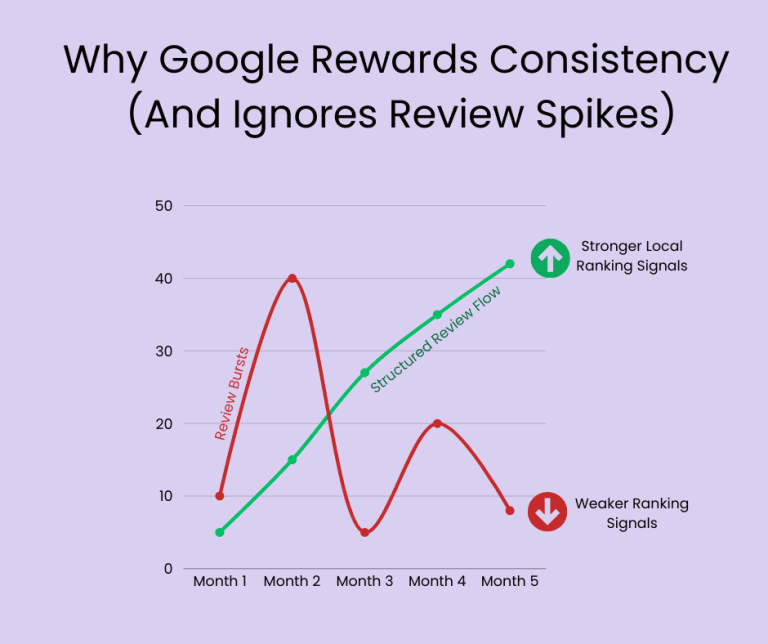
Consistency is what separates businesses with steady review growth from those stuck chasing reviews.
Manual vs Automated Review Systems
Not every business needs the same level of complexity.
Here’s how to choose the right setup for your Google review system.
Manual System (Best for beginners)
A manual system can work if:
- You have low job volume
- You’re just starting out
It usually involves:
- Copy/paste templates
- Calendar reminders
- Manual follow-ups
This is a good starting point — but it has limitations.
Automated System (Best for scaling)
An automated Google review system removes the need for manual effort.
It:
- Sends requests automatically
- Follows up without reminders
- Tracks responses
Automation doesn’t just save time — it improves consistency, which leads to better results.
👉 See the comparison here: DIY vs Review Automation Tools
The Best Simple Setup for Most Small Businesses
If you’re unsure what to do next, keep it simple.
Here’s a practical setup that works for most businesses:
If you’re just starting:
- Use a basic message template
- Send requests manually
- Add 1 follow-up reminder
If you want consistent results:
- Use automation tools
- Build in follow-ups
- Track who responds
The goal isn’t complexity — it’s reliability.
Practical Example: How to Fix a Broken System
Let’s say a local plumbing business wants more reviews.
Before:
- They ask customers randomly
- Only send one message
- No follow-up
Result:
- Inconsistent reviews
- Long gaps with no activity
After implementing a simple Google review system:
- Every completed job triggers an SMS
- A follow-up is sent 2 days later
- A final reminder is sent after 5 days
Result:
- Steady increase in reviews
- More consistent Google visibility
- Less manual effort
The difference isn’t effort.
It’s the system.
Common Mistakes That Break Your Review System
Even small mistakes can weaken your results.
Avoid these:
- Asking too late
- Not following up
- Using the wrong channel
- Overcomplicating tools
- Inconsistent execution
👉 If you’re using tools, make sure they’re not working against you: How to Choose the Right Google Review Automation Tool (Without Wasting Money)
Following Google’s Guidelines (Important)
When building your Google review system, it’s important to stay compliant.
Google specifically prohibits:
- Incentivising reviews (e.g. discounts for 5 stars)
- Filtering reviews based on sentiment
You can read their official policy here:
👉 https://support.google.com/contributionpolicy/answer/7400114
Following these guidelines ensures your reviews remain legitimate and won’t be removed.
Final Thoughts: Your System Determines Your Results
You don’t need more customers to get more reviews.
You need a better Google review system.
When your process is structured:
- Reviews increase consistently
- Visibility improves
- Leads follow
Without a system, you’re relying on chance.
FAQ: Google Review Systems
What is a Google review system?
A Google review system is a structured process used to consistently request, follow up, and collect customer reviews without relying on memory or manual effort.
How often should I ask customers for reviews?
You should ask every satisfied customer after a completed job. Consistency is more important than frequency.
Is it better to use SMS or email for review requests?
SMS often performs better because it’s opened faster and easier for customers to act on immediately, but the best option depends on your audience.
Can I automate my Google review system?
Yes. Many businesses use automation tools to send requests and follow-ups automatically, improving consistency and saving time.
Can I offer incentives for Google reviews?
No. Google prohibits incentivised reviews. You can read their guidelines here: 👉 https://support.google.com/contributionpolicy/answer/7400114