The Complete Guide to Review Automation for Small Businesses (2025)
If you want consistent Google reviews without awkward conversations or remembering to ask every client manually, review automation is the solution. In 2025, Google reviews are one of the strongest ranking signals for local visibility. They influence how often you appear in the Google Maps 3-pack, how much trust customers have in your business, and how many calls you receive each week.
But here’s the truth:
Most small business owners intend to ask for reviews… and then forget.
Jobs get busy.
Days run long.
Customers leave happy but never leave a review.
And your Google presence stays stagnant.
Review automation fixes this by sending your review request link at the right moment, every time, without you lifting a finger. It transforms what used to be random luck into a predictable system — and that system grows your reviews, rankings, and leads consistently, month after month.
This guide walks you through everything you need to know about review automation, from how it works to setting it up, ethical considerations, and the best tools and scripts you can use today.
What Is Review Automation?
Review automation is the process of automatically requesting Google reviews from your customers after a job, appointment, service, or purchase. Instead of relying on memory or awkward follow-ups, the system sends:
- an SMS
- an email
- or both
…with your Google review link attached.
In its simplest form, review automation includes:
- an event trigger (job completed, invoice paid, appointment finished)
- a pre-written message
- your review link
- a follow-up reminder
No chasing. No forgetting. No stress.
Just consistent reviews that help your business grow.
Why Review Automation Is a Game-Changer for Small Businesses
There are four reasons review automation is one of the highest-impact systems you can set up:
1. It increases your review count 3–5x faster
Businesses that automate their review requests typically receive:
- more reviews
- more recent reviews
- more keyword-rich reviews
Fresh reviews are a MAJOR ranking factor on Google Maps.
2. It removes the awkwardness
Small business owners hate asking for reviews manually. With review automation, you don’t have to.
It’s polite, timely, predictable — and your customer doesn’t feel pressured.
3. It builds trust on autopilot
Your Google profile becomes more active, consistent, and trustworthy.
Google sees:
- consistent interaction
- new feedback
- user-generated content
- increased engagement
All of which boost your ranking.
4. It saves HOURS of admin time
You no longer need to:
- remember who to ask
- send individual messages
- follow up
- track responses
Review automation handles all of this in the background.
How Review Automation Works (Simple Breakdown)
Let’s keep this simple.
Here’s how review automation operates:
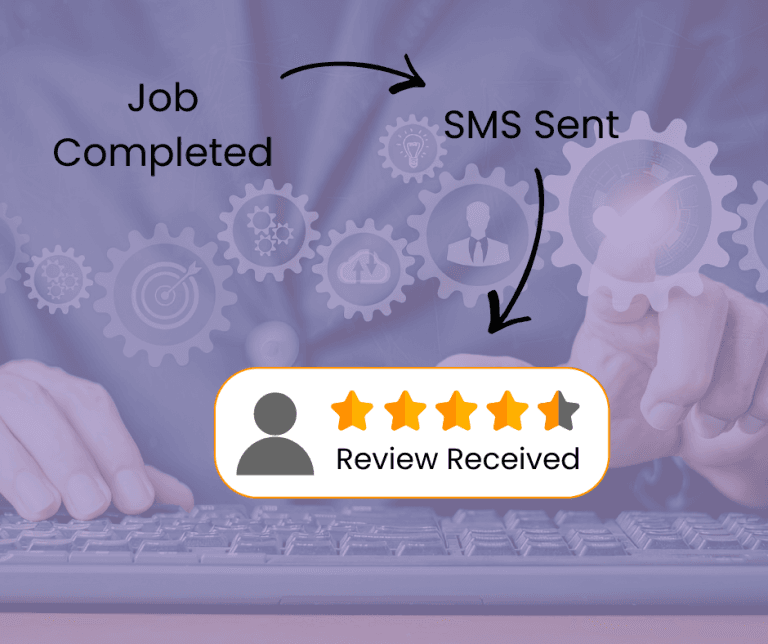
Step 1 — A job or appointment is completed
This triggers the workflow.
Step 2 — A review request message is automatically sent
Usually SMS for highest conversion, sometimes email.
Step 3 — Customer taps your Google review link
No friction = more reviews.
Step 4 — A reminder is sent 24–48 hours later (optional but powerful)
Following up increases conversions by 40–60%.
Step 5 — You receive more consistent reviews
Reviews become predictable instead of random.
This is review automation at its core — and it works incredibly well for tradies, clinics, mobile services, retail stores, and home-based businesses.
Is Review Automation Allowed by Google?
This is one of the most common questions business owners ask before setting up review automation, and it’s a crucial one.
✔ Short answer:
Yes — review automation is allowed by Google.
✔ But…
There are important rules you must follow.
Google allows automated review requests as long as you:
- send the SAME request to all customers
- don’t “review gate” (only asking happy customers)
- don’t incentivise reviews
- don’t pressure anyone
- don’t send mass bulk requests outside normal customer activity
What you cannot do:
- screen customers and hide the link from unhappy ones
- offer discounts, freebies, or rewards
- generate fake or misleading reviews
Google’s official policy:
🔗 https://support.google.com/contributionpolicy/answer/7400114
As long as your review automation applies equally to everyone and is not incentivised, it is completely compliant — and highly effective.
The Best Triggers for Review Automation
When people talk about “triggers” they are talking about when is the best time to ask for the review. You can trigger review automation at several points depending on your business model.
⭐ For tradies:
- Job marked complete
- Invoice paid
- Equipment returned
⭐ For clinics:
- Appointment completed
- After-care message sent
⭐ For retail / hospitality:
- Purchase completed
- Loyalty card scan
- Online order delivered
⭐ For service providers:
- Project delivered
- Document finalised
- Session completed
The key principle:
Send the request when the customer is happiest and most engaged.
Writing the Perfect Review Request Message (High-Conversion Scripts)
The effectiveness of review automation depends on the clarity and tone of your message.
Here are some proven scripts in different formats:
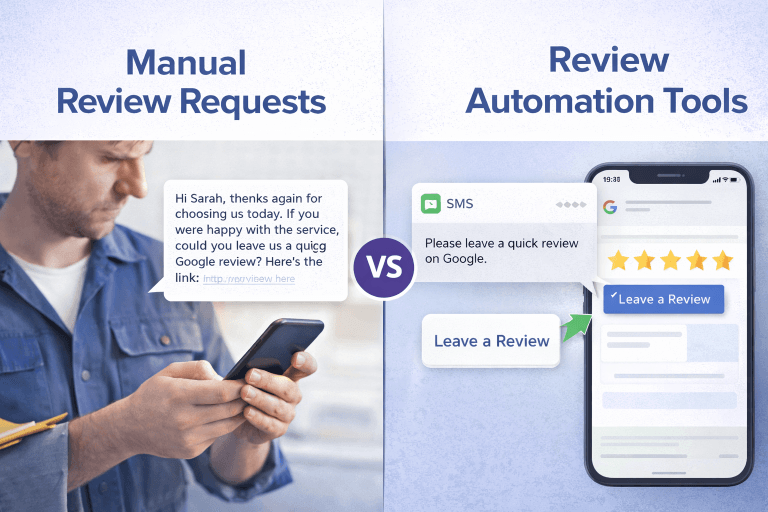
⭐ SMS Script (Highest Converting)
“Thanks for choosing us today! If you have a moment, could you leave a quick Google review? It helps other local customers find us. Here’s the link: [Your Link]”
⭐ Email Script
Subject: Quick Favour
Body:
“Hi [Name], thanks again for choosing us. If you have a moment, we’d really appreciate a quick Google review to help other customers find us. Here’s the link: [Your Link]”
⭐ Follow-Up Script (Gentle Reminder)
“Just checking in — in case you missed our earlier message. Your review helps local customers find us, and it would mean the world. Here’s the link again: [Your Link]”
Tools You Can Use for Review Automation
There are dozens of tools out there, but small businesses don’t need complicated or expensive software.
⭐ Miss K Local Review Booster Toolkit
The Review Booster Toolkit is a simple, effective, small-business-friendly guide to help you build your own (Create QR codes, scripts, SMS templates, email templates, and workflows)

⭐ Miss K Local DIY Review App
The DIY Review App is a simple tool saved to your phone or tablet, which can send sequences of 3 SMS & emails over a specific time period to automatically request and follow up with the client.

⭐ Built-in CRM automations
- Jobber
- ServiceM8
- Cliniko
- Square
- Shopify
⭐ Zapier or Pabbly (Advanced Users)
Perfect for fully custom workflows.
⭐ Google Sheets + SMS tools
Low-cost, flexible, perfect for sole traders.
No matter what tools you use, remember that the best review automation system is the one you will actually use consistently.
Common Mistakes to Avoid With Review Automation
Avoid these pitfalls:
❌ Sending requests too early
Customer might not have seen results yet.
❌ Review gating
Illegal under Google’s policy.
❌ Message too long or too corporate
Short and friendly always converts better.
❌ No follow-up
You lose 50–70% of potential reviews.
❌ Over-automation
Don’t send multiple reminders — one follow-up is enough.
❌ Forgetting to monitor reviews
Automation doesn’t replace engagement.
Avoiding these mistakes keeps your review automation ethical, effective, and Google-compliant.
How Review Automation Improves Google Rankings
Google rewards businesses with:
- frequent reviews
- recent reviews
- keyword-rich reviews
- growing review count
- diverse review sources
- consistent customer engagement
This improves:
- visibility
- trust
- relevance
- local ranking strength
In other words, review automation directly boosts your probability of appearing in the Google Maps 3-pack — the most valuable real estate for local businesses.
How to Set Up Review Automation in 15 Minutes (DIY Setup)
- Create your Google review link
- Choose your message script
- Add the link into an SMS or email workflow in your tool of choice
- Add a follow-up reminder – leave a few days between each
- Test the workflow
- Launch it
- Adjust timing based on customer feedback
When You Should Upgrade to a DFY Review Automation Service?
If you’re:
- too busy
- overwhelmed
- forgetful
- managing high customer volume
- a perfectionist
- using multiple tools
…then DFY (done-for-you) may be easier.
Make sure you spend the time to work out exactly what you need and what parts you need help with. Is it just the tech and set up that you need help with? or do you want someone to spend the time keeping an eye on your business, answering reviews for you, and working out the best strategies to get your business moving up the Google Ranks.
Miss K Local specialises in helping small businesses save time and money by handling their google optimisation and reputation management for them. Check out our services and pricing here.